
REP home
Teammate feedback
See what past teammates wrote about a player, or leave a review after your match.
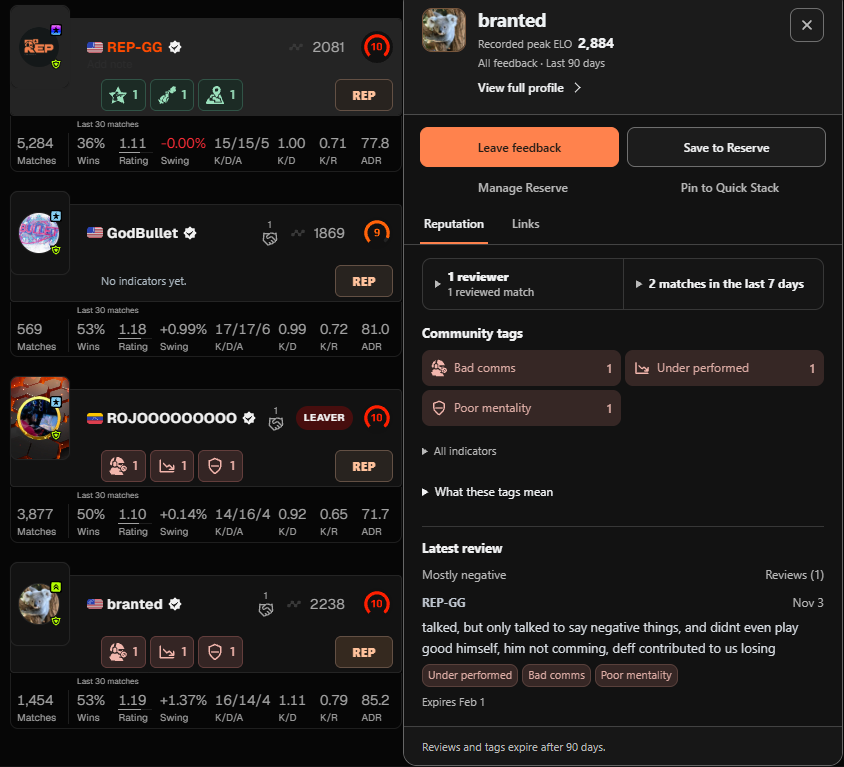
Read a player’s feedback
Click REP beside a player in the matchroom. Latest review shows their latest written review and its expiry date.
Got a written review on your own profile? You can respond to it.
Understand the tags
Under Community tags, each number counts how often teammates picked that tag. They can leave a tag without a comment.
Older reviews may still show the retired Boosted tag.
Leave feedback after a match
- Connect FACEIT. Pick a teammate from a match you finished in the last 90 days.
- Choose Positive, Mixed or Negative. Add at least one tag, a written review or both.
- Click Submit feedback. REP checks new and edited comments. Staff review anything flagged.
You can edit your comment or YouTube clip on the full profile. Your rating and tags stay fixed. Feedback expires after 90 days. To review the same teammate again, finish five more matches together.