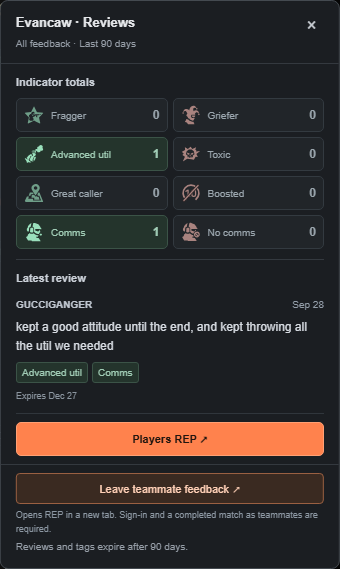
See what teammates say about the players in your FACEIT CS2 matchroom. Read the feedback behind the indicators, remember good teammates, and contribute after an eligible completed match.
Actual REP interface. View full size Player opinions, not verified findings.
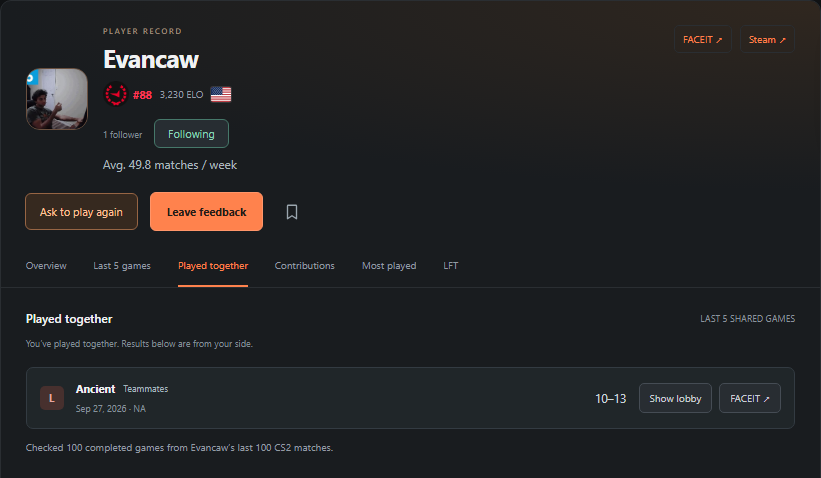
Played together. Shared feedback.
A completed teammate match is required. Leave another entry after five more matches together.
Feedback covers the last 90 days.
Reviews and their category counts expire 90 days after the original submission.
Context from the community.
Player opinions, with no automatic FACEIT penalties.
Start with the feedback.
On supported matchrooms, REP puts review counts and teammate-given tags beneath player names on both teams. Open the feedback to understand the context.
Mostly positiveMixedMostly negativeNo reviews
The count and color summarize written feedback from the last 90 days. No reviews means no feedback yet; it is not a negative rating.
Eight tags. Read the story behind them.
Fragger
Advanced util
Great caller
Comms
Griefer
Toxic
Boosted
No comms
Tags reflect teammate opinions, not verified findings or an official FACEIT skill rating.
30-second screenshot walkthrough of the actual interface. Silent, with on-screen text.
From a quick read to useful feedback.
Watch the 30-second screenshot walkthrough, then try REP in your next supported matchroom.
01
Get a quick read.
See how many reviews a player has, the overall sentiment, and the tags teammates have given them.
02
Open their REP.
The matchroom popup shows indicator totals and the latest written review. Players REP takes you straight to that player’s profile and reviews from the last 90 days.
03
Leave something useful.
Connect FACEIT in REP and choose a completed teammate match. Mark your feedback positive, mixed, or negative, add indicators, and leave a short review. You can edit the text later; the rating and indicators stay fixed.
Read the walkthrough
ELO tells you how a player ranks. What are they like to play with?
Open REP feedback in the matchroom. Read the review behind the indicators.
Played together? Leave fair feedback after an eligible completed match.
Feedback reflects player opinions. Reviews and tags expire after 90 days.
Install the free desktop Chrome extension from the Store link above.
Put a player in context.
Recent games. Shared history. The teammates worth remembering.
Scroll across to inspect the interface.Revisit a match you shared. Actual screenshot; one shared match shown. View full size
Profiles and shared games
See FACEIT level and ELO alongside community feedback, recent games and most-played maps. Played together brings back your last five shared matches, with wins and losses.
What the profile information means
Most played with shows frequent teammates from recent match history; it does not assume they queued together. Contributions shows the latest five public feedback entries a player has left.
Saved players and private notes
Bookmark a good teammate and leave yourself a note for the next queue. Your saved players stay together in REP.
Saving a player or writing a private note does not notify them. Sending a play invitation does.
Looking to PUG
Find available players from recent games and others within 400 ELO. Send a play invitation they can accept or decline.
Availability, friends and notifications
Availability lasts one hour unless renewed. Accepted REP friends appear across all ELO levels. These are accepted connections in REP; REP does not import your FACEIT friends list.
The REP bell shows feedback notifications. Optional desktop alerts cover incoming PUG invitations and accepted invitations; Chrome must be running and your notification settings apply.
Tools for your next queue.
Optional controls on supported FACEIT pages. Choose what fits the way you play.
Quick Stack and Sort friends
Keep favorites close in Quick Stack and use Sort friends in FACEIT's expanded friends view. Quick Stack uses FACEIT's native invite flow.
Quick Stack favorites are saved in this browser. These FACEIT friend tools are separate from accepted REP friends and PUG invitations.
Match tools
Choose REP's match tools or companion mode when using another FACEIT extension. Companion mode turns off REP auto-accept and friend sorting.
Before using optional auto-accept
Auto-accept is optional and works with supported English FACEIT ready checks. It waits three seconds and lets you cancel. Keep Chrome running and use only one extension's auto-accept at a time.
Stay part of the conversation.
Share a play. Follow a player. Recognize useful contributions.
Community posts and clips
Share a status, YouTube clip or montage. Published posts appear newest first, with likes, comments and replies. Profiles show the latest three posts with a link to see more.
Posts and comments go through screening or staff review before publication. Videos require staff review and load only when you press Play.
Following and privacy
Follow a player from their REP profile. Follower counts are public; only that player can see who follows them. Likes and follows do not reorder the Community feed.
Following is separate from an accepted REP teammate connection. Saved players and private notes stay private.
Contributor rankings
The contributor leaderboard highlights players sharing teammate feedback. Tags and text together count as one contribution; edits do not add another. A player's Contributions tab shows their latest five public entries.
Your next lobby. A little more context.
Install REP from the Chrome Web Store, then open a FACEIT CS2 matchroom. Join our Discord for help, updates and a direct place to share feedback.
Install REP in desktop Chrome, refresh your FACEIT tabs, then open REP and connect your FACEIT account when you want to leave teammate feedback or use account features. Chrome handles Store updates automatically.
REP’s interface supports English, German, Spanish, French, Polish, Portuguese, Russian, and Turkish. Player-written reviews stay in their original language.
Use the public Store release.
The Chrome Web Store is the normal installation path. Local Beta builds may contain unreleased interface changes; those changes are not promised by the Store download. Existing screenshots illustrate the feedback and shared-match views.
Teammate feedback is public in REP. Your saved players and personal notes stay private.
This website
This is an informational page. It does not offer sign-in, accept reviews, or include advertising or analytics scripts added by REP. The hosting provider may process technical request data to deliver and secure the page.
The extension
REP associates feedback with player IDs, match IDs, and reviewer nicknames. FACEIT account and match information support sign-in, profile details, and checks that reviewers played on the same team. Feedback expires 90 days after its original submission.
Public posts, approved comments, follower counts and contributor rankings are visible to other REP users. Only the person being followed can see their follower list. PUG invitations are shared with their participants.
New and edited written feedback, Community posts and comments go through text screening. Text that passes can publish automatically; flagged or incomplete checks wait for REP staff. Videos require staff review. Report questionable content in REP, or open your connected account to delete your REP data.
 Know Your TeammatesAvailable on Chrome